> For the complete documentation index, see [llms.txt](https://resources.unizin.org/llms.txt). Markdown versions of documentation pages are available by appending `.md` to page URLs; this page is available as [Markdown](https://resources.unizin.org/products/content/unizin-order-tool/entitlements/entitlements-students.md).
# Entitlements (Students)
An entitlement is a "proof of purchase" receipt for your digital course materials. Entitlements are records established upon purchase of a digital course material.
You will receive an entitlement to a digital course material if you [accept the offer](/products/content/unizin-order-tool/student-choice.md) and purchase the material. Once your purchase is made final, the entitlement is captured and the course material will be included in your purchase history. Purchases are made final once the bill-after date has passed for the section. This date varies for each institution but typically corresponds with the add-drop deadline for the course.
Each entitlement describes how long you may access the material before needing to re-purchase it. Once purchased, all eText materials are available to you for the duration of your institutional enrollment. The length of access for Digital Learning Technology (DLT) materials, which include courseware and homework platforms, vary by title and publisher. Length of access information is specified for each title in your purchase history.
### Review purchase history
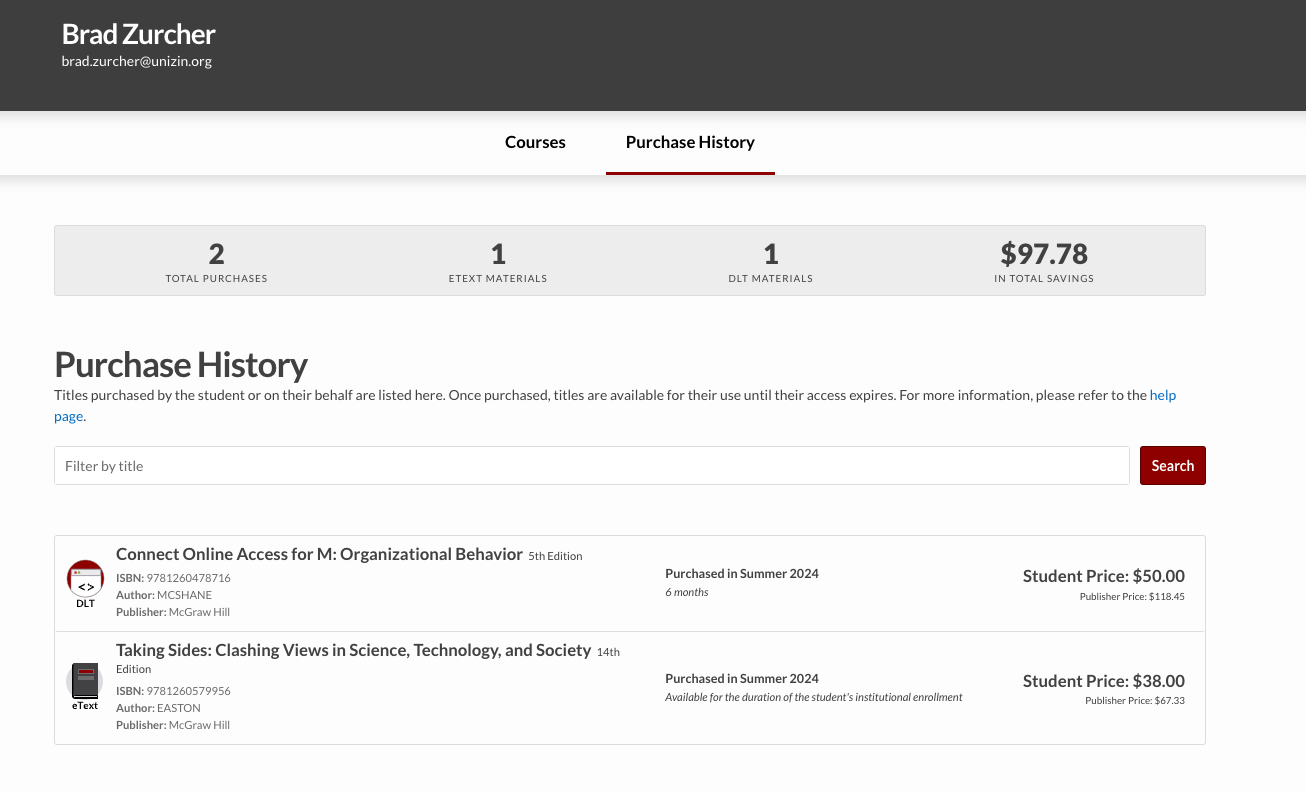
As a student, you may view your purchase history in Order Tool. In the “Purchase History” view, you can see the digital course materials you have purchased, the term the material was purchased, and how long you have access to it. You can also see the purchase price of each course material and your total savings based on purchases made through your institution’s digital content program.
In order to view your purchase history, navigate to the “My Account” menu, then select the “Purchase History” view.
Once a purchase has been made final, it will be included in your purchase history.